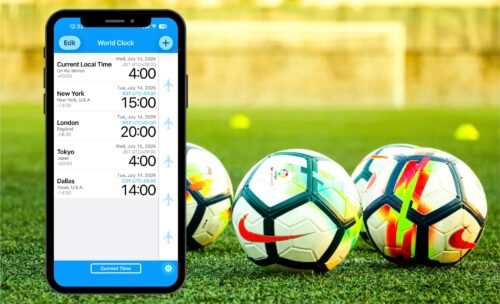
The FIFA World Cup 2026 is the largest tournament in history, co-hosted by the United States, Canada, and Mexico. With matches spread across 16 host cities and multiple time zones, you might be wondering:
“What time will my favorite match air in my local time zone?”
Looking at the official match schedule and constantly stressing over mental math—”Wait, is my city hours ahead or behind? Do I add or subtract?”—is a hassle you don’t need.
In this article, we’ll show you how to check World Cup kickoff times instantly using a free and convenient time zone converter app called “World Clock -Time Converter-.”
Say Goodbye to Confusing Math! What is “World Clock -Time Converter-“?
The best feature of “World Clock -Time Converter-” is its intuitive design, allowing you to scroll and sync multiple cities’ times simultaneously.
To demonstrate how it works, let’s look at Dallas Stadium (AT&T Stadium), which will host the highest number of matches (9 matches, including the semifinals) during the 2026 FIFA World Cup.
> 💡 Quick Fact:
> Dallas is in the Central Time Zone and observes Daylight Saving Time (CDT / UTC-5) during the World Cup. However, when using “World Clock -Time Converter-,” you don’t need to know any of these complicated time zone rules!
Step 1: Add Dallas to Your Main Screen
Once you download the app, the following four locations are pre-registered on the main screen by default:
・Current Local Time
・ New York
・ London
・Tokyo
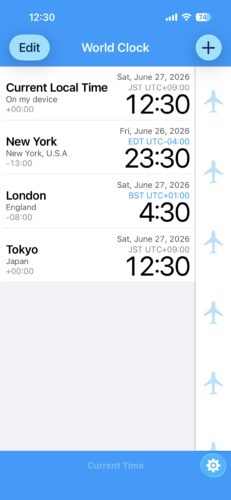
Let’s add Dallas, the major World Cup stage, to your list:
1. Tap the “+” (Plus) button in the top right corner to open the “City selection” screen.
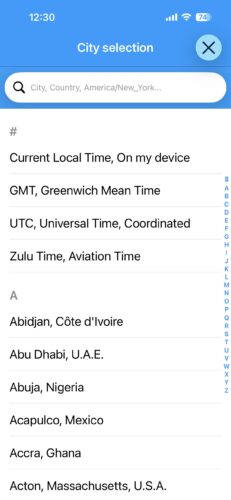
2. Type “Dallas” into the search bar.
3. Select “Dallas, Texas, U.S.A.” from the results to add it to your main screen.
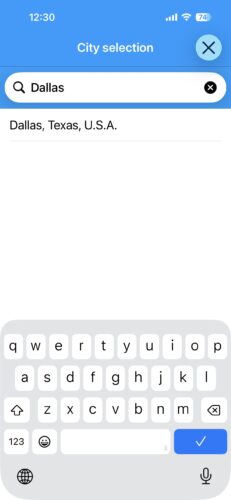
⚠️Note: Technically, Dallas Stadium is located in the neighboring city of Arlington, but since they share the same time zone, adding “Dallas” works perfectly.
🚀Pro-Tip for International Readers: You can add your own home city using the exact same steps. (If your specific city isn’t listed, simply choose a larger nearby city in the same time zone.)
Step 2: Scroll the Time Bar to Convert Times Intuitively
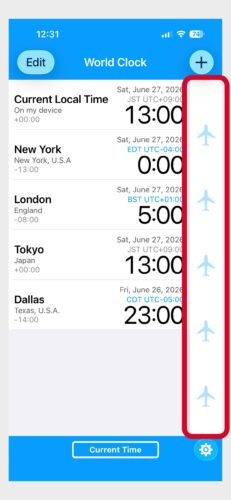
Simply scroll the “Time Bar” on the right side of the main screen, and the times for all registered cities will change in perfect sync. No more annoying additions or subtractions.
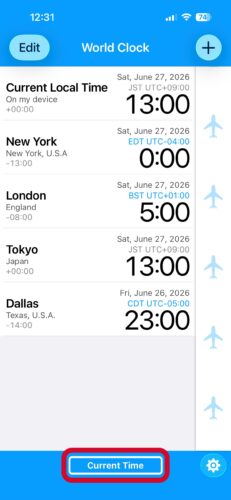
Reset to current time: Tap the “Current Time” button at the bottom of the screen to instantly snap back to the present moment.
Move hour by hour: Double-tap the Time Bar to switch to 1-hour increments (the bar icon will turn darker). Double-tap again to switch back to standard 1-minute adjustments.
Step 3: Set a Specific Match Date and Time (Semifinal Example)
Instead of just scrolling, you can pinpoint a specific match date and time. Let’s look up the exact kickoff time for the high-stakes Semifinal at Dallas Stadium.
The 2026 FIFA World Cup Semifinal is scheduled to kick off at 14:00 local time on July 14.
1. Tap the “Dallas” row on the main screen to open the date/time picker.
2. Set the time to “July 14, 14:00” and tap the checkmark in the top right corner.
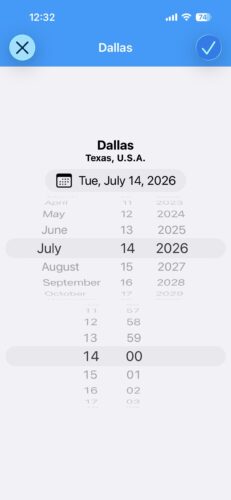
Now, every city on your screen will instantly update to show what time it is locally when it’s 14:00 in Dallas.
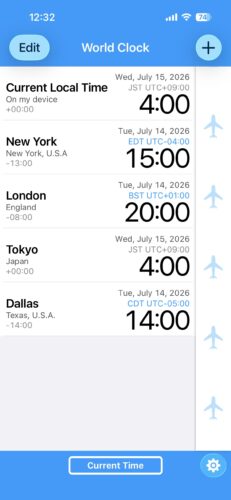
As you can see, 14:00 in Dallas translates to 4:00 AM on July 15 in Japan!
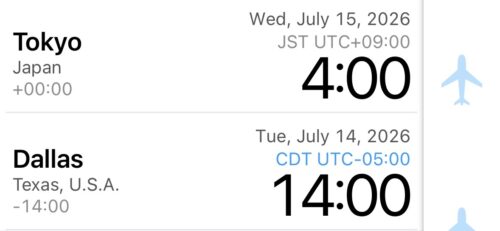
Whether staying up all night or waking up incredibly early, Japanese football fans are going to need a lot of coffee☕️. What time does the match start in your city?Check it instantly with the app!
Conclusion: Get “World Clock -Time Converter-” Ready so You Never Miss a Match!
That is how you can use “World Clock -Time Converter-” to make your World Cup viewing experience 100x easier!
With matches spread across North America, the time differences are massive. The last thing you want is to mess up the kickoff time and wake up realizing you missed an epic match. Having this app handy makes planning your watch parties and adjusting your work schedule seamless.
The app is completely free to use. Don’t miss out on the crucial upcoming matches and knockout stages—download it today and get ready to enjoy the World Cup to the fullest!
📥 Download “World Clock -Time Converter-” for Free Here